
Verify your bank account
Once you hold a personal or business ID credential, you can link a South African bank account to earn your Bank Account credential.
Before you start
Bank account verification is only available after you hold at least one of the following credentials:
- Person ID Credential — issued after completing personal identity verification (KYC)
- Business ID Credential — issued after completing business identity verification (KYB)
This requirement exists because VERA needs to confirm who owns the account before verifying the bank details against it. If you haven't completed identity verification yet, see Verify your personal identity or Verify your business identity first.
How it works
VERA makes a direct call to all major South African banks using the core information from your identity or business credential — your legal name, ID number, and registered details. The bank confirms whether those details match the account holder on record.
No login to your bank account is required. There is no screen-scraping or open banking redirect — VERA queries the bank's verification APIs directly.
Start the verification
Open the Wallet section
Click Wallet in the left sidebar and select the Identity or Business tab depending on which credential you want to verify a bank account against.
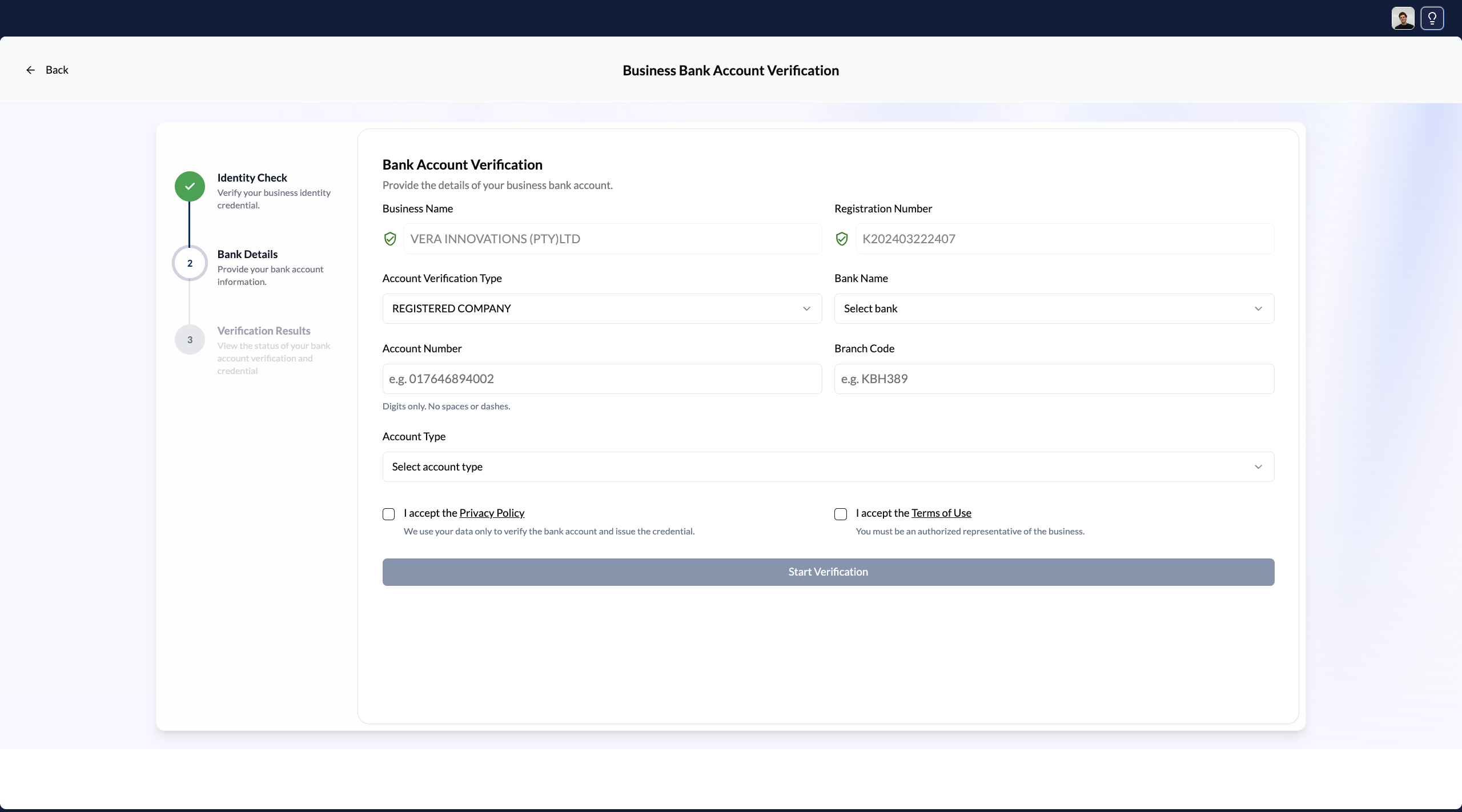
Click Verify Bank Account
Below your existing credentials, you'll see the option to add a Bank Account credential. Click Verify Bank Account to begin.
Enter your bank account details
Provide:
- Your bank (select from the supported list)
- Your account number
- Your account type (current /savings /cheque)
These details must match exactly what your bank holds on file against your identity.
Submit and wait for confirmation
Click Submit. VERA sends the verification request to your bank. Most responses return within a few seconds. You'll see a confirmation screen once the bank has confirmed the match.
Your Bank Account credential is issued
Once confirmed, your Bank Account credential appears in your wallet. It shows your bank name, your account number, and the verification date.
Capitec Business Bank accounts cannot currently be verified through this flow. Capitec personal accounts are supported. If you bank with Capitec Business, contact VERA Support for alternative options.
Supported banks
VERA supports verification with all major South African banks, including:
- ABSA
- FNB (First National Bank)
- Nedbank
- Standard Bank
- Capitec (personal accounts only)
- Discovery Bank
- Investec
- African Bank
Your bank account number is verified against your identity. VERA cannot initiate any transactions on your account.
What the credential proves
The Bank Account credential confirms:
- The bank account exists and is active
- The account belongs to the identity (personal or business) you've verified on VERA
- The verification was performed at a specific date and time
When you share this credential with a contact — such as a client paying you or a business onboarding you as a supplier — they receive cryptographic proof that this is your legitimate account, without you having to share a bank statement or letter of confirmation.